
ChimeChat: AI Character Chat
HamlikygerEntertainment
4.7518.00 Reviews
- Version
- 1.0.4
- Installs
- 100.00K
- Age Rating
- Mature 17+
Screenshots



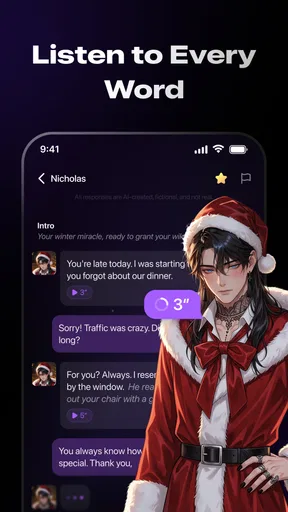
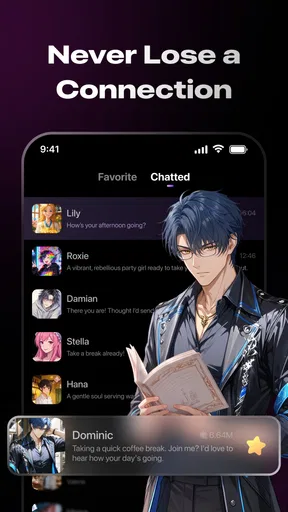
Our Review of ChimeChat: AI Character Chat
 Analysis by Appyee
I approached ChimeChat as an entertainment app for moments when I wanted a conversation rather than another stream of short videos. Its central idea is simple: I can chat with an AI character in a more personal, friendly setting. That makes it feel closer to an interactive companion than to a conventional media app, although the quality of the experience depends heavily on how clearly I guide the conversation.
The app comes from Hamlikyger and is free to use, which removes the biggest barrier to trying it. It is listed for mature users aged 17 and over, so I would not treat it as a general family chat tool. The current release is version 1.0.4, and it runs on Android 7.0 or later. Those details matter if you are using an older phone or deciding whether the app belongs on a shared family device.
From a spare moment to a usable conversation
When I move from a spare moment into a real exchange, I find it helps to decide what I want from the next few minutes before typing. A simple aim—testing a line of dialogue, unwinding with a fictional scene, or sorting through one small decision—keeps the chat purposeful without making it feel like work. That also gives me a useful way to judge how smoothly the conversation holds up when I keep returning to it.
Starting with the right expectation
The first thing I would tell a friend is not to open this expecting a search engine, a therapist, or a replacement for a real relationship. The appeal is the act of shaping a conversation with an AI character. I found it most enjoyable when I entered with a small purpose: relaxing after work, testing a fictional scenario, brainstorming dialogue, or simply seeing how a character would respond to an unusual question.
That starting condition changes the whole experience. If I type a vague greeting and wait for the app to entertain me indefinitely, the exchange can feel ordinary. If I give the conversation a role, mood, or small problem to solve, it becomes much easier to get something distinctive from it. A prompt such as “help me plan a calm evening after a stressful day” gives the chat a direction without turning it into a rigid task.
This is where the app differs from passive entertainment. A video platform gives me something to consume immediately, while ChimeChat asks me to contribute the first useful idea. For people who enjoy improvisation, that involvement is the attraction. For anyone wanting instant, polished content with no effort, the usual alternatives will probably feel more convenient.
Building a conversation one turn at a time
My preferred workflow is to begin with one clear request, read the response carefully, and then narrow the next message. Instead of loading several demands into one prompt, I treat the chat like a conversation with a defined subject. I might begin with a character scenario, ask for a specific tone, and then introduce a complication. This makes the exchange easier to follow and gives the AI a better chance of maintaining the direction.
A useful trick is to state what I want the character to do and what I do not want it to do. For example, I can ask for a short, playful reply rather than a long explanation, or request that the character stay inside a fictional scene. This is not a hidden setting; it is a practical way to reduce wandering responses. The more precise my instruction, the less time I spend correcting the conversation.
I also get better results when I separate creative play from factual questions. An AI character can be entertaining when inventing a scene or adopting a personality, but I would not automatically treat every answer as reliable information. If I need an exact fact, I prefer checking a trusted source separately. That boundary is especially important because the mature rating signals that the app is not designed as a child-focused environment.
A realistic everyday use case
Imagine coming home with twenty minutes to spare before meeting friends. I might open the app and ask a character to help me rehearse an awkward conversation, but in a light role-play format. First, I explain the situation in one or two sentences. Next, I ask the character to respond as the other person. Then I answer naturally and request a different reaction if I want to test another approach.
The useful outcome is not a perfect script. It is the chance to try several versions without putting another person on the spot. I can notice which wording sounds too defensive, which question opens the discussion, and which response feels more natural to me. After that, I can leave the chat and use the strongest idea in the real conversation. In this workflow, the app is a rehearsal space, not the final destination.
Another good fit is creative block. I can ask a character to challenge a story idea, play a fictional role, or react to a scene from a different point of view. The handoff happens when I take the useful suggestion out of the chat and put it into my own notes or draft. I would still edit the result myself, because AI-generated ideas can be repetitive or too eager to resolve a conflict.
Managing the handoff between imagination and reality
The most important handoff is the one from the app back to my own judgement. ChimeChat can provide momentum, but it does not decide whether a suggestion fits my circumstances. When I use it for planning, I treat the conversation as a first draft. I check practical details elsewhere, remove anything that sounds unrealistic, and keep only the parts that help me move forward.
That approach also prevents the chat from becoming a loop. If a response misses the point, I do not keep repeating the same request. I restate the goal in simpler language, add one concrete example, or change the format. Asking for three short options can be more useful than asking the character to “try again” without further guidance. This small workflow improvement makes the app feel more responsive even when the first answer is weak.
For fictional conversations, the handoff is different. I may stay inside the role for several turns, then deliberately step outside it and ask for a summary of what happened. That gives me a clean transition from play to reflection. It is a practical way to turn an entertaining exchange into something I can use for writing, rehearsal, or personal brainstorming.
What the experience delivers
At its best, the app gives me a low-pressure place to explore an idea. The friendly conversational format is less demanding than composing a full document and more active than scrolling through entertainment. I can test a mood, ask for a different perspective, or continue a fictional setup at my own pace. That flexibility is the strongest reason I would recommend trying it.
The public response is encouraging: ChimeChat holds a 4.7 average from around 4.6 thousand ratings, and it has passed 100 thousand installs. Those figures suggest that the concept is connecting with a meaningful audience, although they cannot predict whether a particular character or conversation style will suit me. I would use the positive reception as a reason to experiment, not as proof that every exchange will be excellent.
The result also depends on how much effort I am willing to put into steering. A thoughtful prompt can lead to a surprisingly engaging exchange, while a rushed message may produce a generic answer. That is a fair trade-off for an interactive entertainment app, but it should be clear before downloading: the app supplies a conversational partner, not a guaranteed storyline.
Where the flow becomes less comfortable
The first friction point is consistency. AI conversations can lose their original tone or forget an important detail as the exchange grows. When that happens, I need to remind the character of the setting or restate the key constraint. This interrupts immersion, particularly during role-play. Shorter sessions with occasional summaries work better for me than expecting an endlessly coherent narrative.
A second limitation is emotional judgement. A friendly response can feel convincing, but it is still generated interaction. I would avoid using the app as my only support for serious emotional distress, major personal decisions, or situations where a qualified human should be involved. The conversational style may feel personal without carrying the accountability of a real friend or professional.
There is also a privacy habit I would strongly recommend: I would keep identifying details out of casual chats. I can describe a situation without including full names, addresses, account information, or private messages. That makes the app easier to use responsibly and does not reduce the creative value of most prompts. The mature age rating is another reason to think carefully before letting younger users access it.
People who mainly want factual research may be better served by a dedicated search or reference tool. Someone who wants a group discussion should use a real messaging app. And if I am looking for a polished story, podcast, or video that requires no participation, a traditional entertainment service is the better choice. ChimeChat earns its place when interaction itself is the point.
Small techniques that improve the outcome
I found three habits especially useful. First, I give the character a clear job for the next few turns rather than asking it to be generally interesting. Second, I request a format that matches my goal, such as brief replies for rehearsal or a sequence of prompts for brainstorming. Third, I end a productive session by asking for the key ideas in a compact recap, then copy only the parts I genuinely want to keep in my own work.
Another worthwhile technique is controlled disagreement. Instead of asking the character to agree with every idea, I ask it to point out one weakness and offer one alternative. That turns a pleasant chat into a more useful creative test. I would not accept the criticism automatically, but it can reveal assumptions I had overlooked.
For recurring projects, I would begin each new conversation with a small context note rather than assuming the app will remember everything. I can include the goal, the tone, and the current stage in a few lines. This creates a cleaner handoff and reduces the chance that the character starts from the wrong premise. It is a little extra work, but it is more reliable than trying to repair a confused exchange several turns later.
Who should try it
I think ChimeChat is a good match for adults and older teens who enjoy character-driven interaction, improvisation, casual brainstorming, or low-pressure rehearsal. It is particularly appealing if I want entertainment that responds to my choices instead of delivering the same content to everyone. The free price makes it easy to test that style without committing first.
I would skip it if I dislike typing, expect flawless memory, or need authoritative answers. I would also avoid presenting it to a younger child simply because the conversation feels friendly; the mature rating should be taken seriously. For sensitive personal matters, a trusted person or qualified service remains the more appropriate option.
My final take after using the workflow
ChimeChat works best when I treat it as an interactive creative companion: I arrive with a small goal, guide the character through a few focused turns, and carry the useful result back into real life. Its strengths are accessibility, conversational flexibility, and the ability to make ordinary downtime more participatory. Its weaknesses are the familiar limits of AI dialogue, including uneven continuity and the need for careful judgement.
Developed by Hamlikyger, this entertainment app is worth trying if the idea of shaping a conversation sounds more appealing than passively watching something. I would recommend it to a friend who wants to rehearse an idea, explore a fictional situation, or break through a creative pause. I would not recommend relying on it for expert advice or serious emotional support. The best results come when I use the chat as a starting point, then make the final decision myself.
Verdict
Strengths of ChimeChat: AI Character Chat
- Wide variety of AI characters with different personalities and conversation styles.
- Simple chat interface makes it easy to start conversations quickly.
- Useful for creative roleplay, storytelling, and brainstorming ideas.
- Conversations can feel more engaging than standard chatbot interactions.
- New character experiences may keep the app interesting over time.
Limitations of ChimeChat: AI Character Chat
- AI responses may occasionally feel repetitive, inaccurate, or out of character.
- Some characters or features may require in-app purchases or subscriptions.
- Long conversations can lose context or contradict earlier messages.
- Privacy concerns may arise when sharing personal information in chats.
- The app may require a stable internet connection for most interactions.
Similar Picks in This Category
View All
Google Play Games
Google LLC3.9

Netflix
Netflix, Inc.4.8

YouTube Kids
Google LLC4.2

Disney+
Disney4.4

Prime Video
Amazon Mobile LLC4.7

Steam
Valve Corporation3.2
Frequently Asked Questions
What is ChimeChat: AI Character Chat?
ChimeChat: AI Character Chat is an interactive chatbot app that lets you communicate with AI-powered characters through text conversations. Each character is designed with a particular personality, tone, or role, so chats can feel different depending on who you choose. It may be used for casual conversation, creative storytelling, roleplay, brainstorming, or simply passing the time with an always-available virtual companion.
How does chatting with characters in ChimeChat work?
After opening the app, you generally select an available AI character and begin a conversation by sending messages. The character responds based on its programmed personality and the context of your chat. In our experience, the quality of replies depends heavily on how clearly you write your prompts and how long the conversation continues. Like other AI chat apps, responses can occasionally be repetitive, inaccurate, or inconsistent.
Is ChimeChat: AI Character Chat free to download and use?
ChimeChat may be available to download at no initial cost, but free access does not necessarily mean that every feature is unlimited. Apps in this category commonly include advertising, message limits, premium characters, subscription plans, or in-app purchases. Before starting an extended conversation, check the current store listing and the app’s payment screen carefully so you understand which features are free and what charges may apply.
Does ChimeChat contain age restrictions or content that parents should review?
The type of conversations available in an AI character app can vary considerably depending on the characters, prompts, and moderation system. Some interactions may include mature themes, emotional topics, romance, or language that is not appropriate for children. Parents should review the app’s age rating, privacy settings, content controls, and terms of use before allowing younger users to access it, and should avoid sharing sensitive personal information in chats.
Is my information private when I use ChimeChat?
You should not assume that conversations in ChimeChat are completely private. Messages may be processed by the app’s servers or third-party AI services, and data practices can change between versions. Before using the app, read its privacy policy to learn what information is collected, how chats are stored, whether conversations are used to improve the service, and how account deletion works. Avoid entering passwords, financial details, private documents, or identifying personal information.
